Azure Blob Storage
Writes batches of records as blobs in an Azure Blob Storage container.
Example
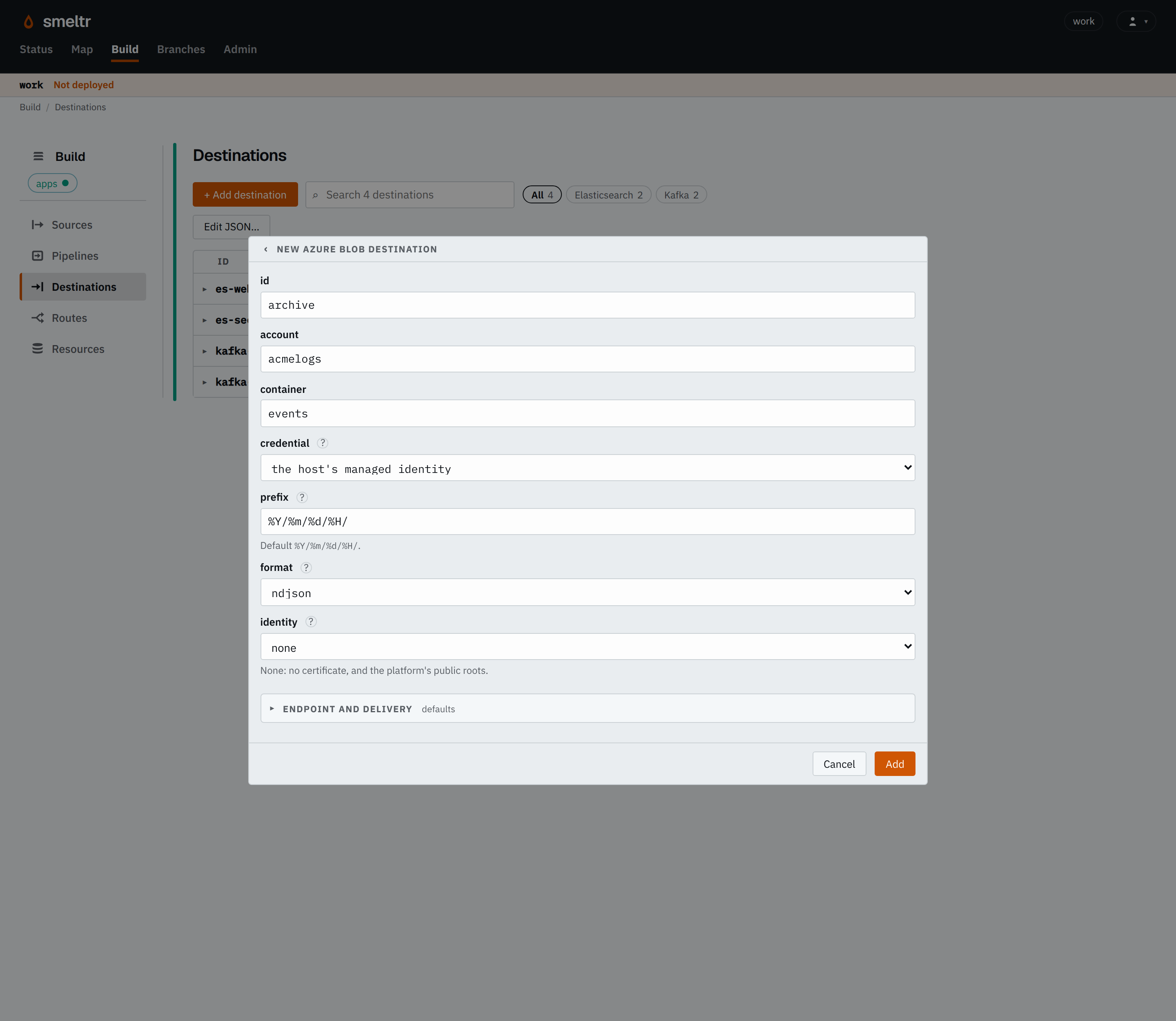
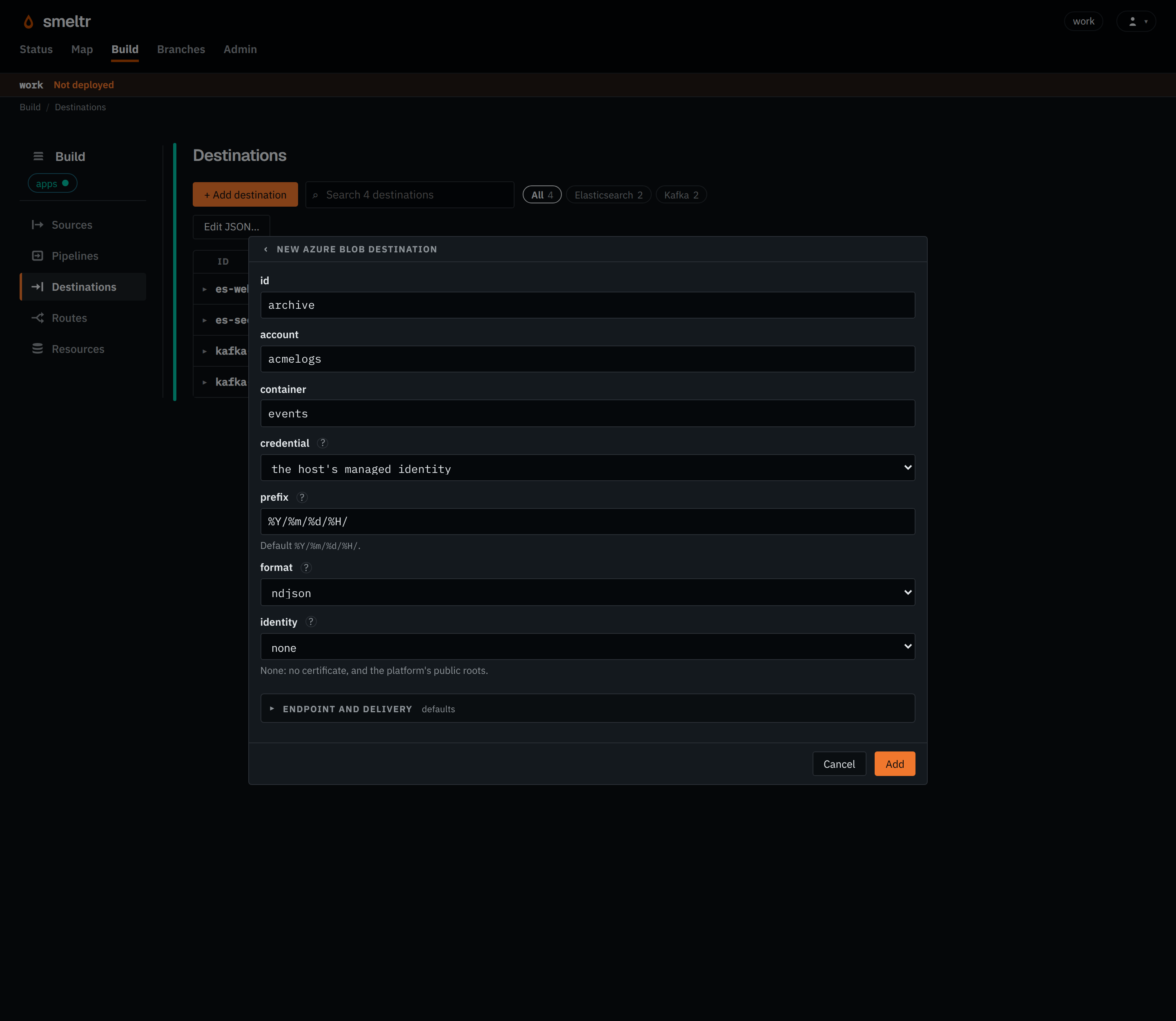
Writes as the worker host's managed identity.
{
  "id": "archive",
  "type": "azureBlob",
  "account": "acmelogs",
  "container": "events"
}
Before you start
- Create the storage account and container.
- Choose how it signs in, and give that identity permission to write blobs to the container. A
key, signature or client secret goes in a credential.
- the worker host's managed identity, or a service principal, either given a role such as Storage Blob Data Contributor (see assign a role for blob data);
- an account key; or
- a shared access signature allowed to create and write blobs.
Settings
It also takes the settings every destination takes.
account string required
The storage account.
acmelogsacmeprodaudit01container string required
The container.
eventsaudit-logsaccessKey credential default none
The credential holding the account's access key. Set at most one of accessKey, sasToken, clientSecret and managedIdentityClientId; with none, the host's managed or workload identity is used.
AZURE_ACCESS_KEY{"secret": "azure-access-key","version": 1}sasToken credential default none
The credential holding a shared access signature.
AZURE_SAS_TOKEN{"secret": "azure-sas-token","version": 1}tenantId string default none
A service principal's tenant. Set tenantId, clientId and clientSecret together, or none of them.
00000000-0000-0000-0000-000000000000acme.onmicrosoft.comclientId string default none
A service principal's client id.
11111111-1111-1111-1111-111111111111clientSecret credential default none
The credential holding a service principal's client secret.
AZURE_CLIENT_SECRET{"secret": "azure-client-secret","version": 1}managedIdentityClientId string default the host's managed or workload identity
The client id of the user-assigned managed identity to sign in as. Set it when the worker's host has more than one managed identity. Left out, it signs in as the host's managed identity, or an AKS pod's workload identity.
22222222-2222-2222-2222-222222222222prefix string default %Y/%m/%d/%H/
What each object's key starts with, for a record with no __destination.prefix. %Y, %m, %d, %H and %M are the write time, UTC, and no other % is allowed. A key never starts with /.
events/%Y/%m/%d/firewall/dt=%Y-%m-%d/hour=%H/acme/audit/format string default ndjson
What each object holds.
ndjson- Writes one JSON document per line.
json- Writes one JSON array of every record.
parquet- Writes one Parquet file.
avro- Writes one Avro file.
csv- Writes one CSV file.
text- Writes one line of text per record, from
field. bytes- Writes each source record's bytes as read, before pipeline processing, one per line:
__source.bytesunlessfieldnames anotherbytesfield.
field string default _raw for text, __source.bytes for bytes
The field each line of a text or bytes object holds. Only with format text or bytes.
messagenewlines string default escape
What a bytes object does with a record holding a line break. Only with format bytes.
escape- Writes
\, newline and carriage return as\\,\nand\r, which a source with framingescapedLinesreverses. refuse- Refuses the record.
identity identity default none
The connection identity it connects under, for a private CA or a client certificate.
store-clientcorp-proxyAdvanced: Endpoint and delivery
endpoint string default the account's, in Azure's public cloud
Another address, such as Azurite's or a sovereign cloud's.
http://localhost:10000/acmelogshttps://acmelogs.blob.core.usgovcloudapi.netauthEndpoint string default its cloud's own
Where a client secret is exchanged for a token. Only with clientSecret.
https://login.microsoftonline.ushttps://login.chinacloudapi.cncompression string default gzip
How it compresses each object. A parquet object compresses each column inside the file instead, and its key ends with .parquet whatever the compression. An avro file compresses inside the file, and its key ends with .avro. Its gzip is Avro's deflate. Avro has no lz4.
none- Writes it uncompressed. The key ends with the format's own extension, such as
.ndjson. gzip- Compresses it with gzip and appends
.gzto the key, such as.ndjson.gz. snappy- Compresses it with framed Snappy and appends
.szto the key, such as.ndjson.sz. lz4- Compresses it with framed LZ4 and appends
.lz4to the key, such as.ndjson.lz4. zstd- Compresses it with Zstandard and appends
.zstto the key, such as.ndjson.zst.
storageClass string default the account's default
The access tier each blob is stored in: Hot, Cool, Cold or Archive.
CoolColdinFlight integer default 4
How many parts of one file upload at once. 1 to 64.
812maxObjectBytes size default 64 MiB
The largest file it puts in the bucket, compressed. Set it to what the tools that read the bucket handle best. 64 KiB to 64 GiB.
128 MiB2 GiB32 MBbufferBytes size default 256 MiB
Memory it may use on each worker for records not yet in the bucket. Files are finished early when it fills, so files reach maxObjectBytes only when it holds that many records before compression. 4 MiB to 32 TiB.
1 GiB4 GiBstallAfterSecs integer default 30
Seconds one call to the store, or one finishing of the files, may take before it counts as stalled. 1 to 120, and at least 15 on SFTP.
60120fileIntervalSecs integer default 60
The longest records wait, in seconds, before they land in the bucket. A longer wait makes larger files; records are acknowledged only once they land, so a source is held open up to this long, and after a crash reads that much again. 5 to 3600.
30240Fields it reads
| Field | Type | Holds |
|---|---|---|
__destination.prefix | str | What an S3, Google Cloud Storage or Azure Blob Storage destination's object key starts with, taken as it is. Null means the destination's own prefix, with its time placeholders filled in. |
How it works
The destination keeps one blob open per prefix, and for Parquet, Avro and CSV per record type of
the routes feeding it, across batches, named <prefix><random id>.<extension>, and finishes it when it reaches maxObjectBytes on disk, when fileIntervalSecs passes, when bufferBytes fills on the worker, or when a 65th blob opens and this one
was written least recently. A batch is acknowledged once every blob holding its records has landed.
Two blobs never share a key, so records written again after a failure make new blobs.
Verify
Send a record with a unique marker through the source, then list the container under the prefix for a new blob and look for the marker in it.
Troubleshooting
- Authorization fails
- Check that the identity has a role such as Storage Blob Data Contributor on the container, or that the SAS token allows creating and writing blobs.