Pipeline reference
Lookup step
A Lookup step matches one field of each record against a lookup table and writes values of the matching entry into the record as new fields.
A lookup table is a table of entries shared by id: a CSV file, an inline table typed into the editor, or an MMDB file of IP networks. A record whose input matches no entry is a miss, and each output takes its default on miss instead.
Example
| user | team | level |
|---|---|---|
alice | payments | 3 |
bob | search | 1 |
Step
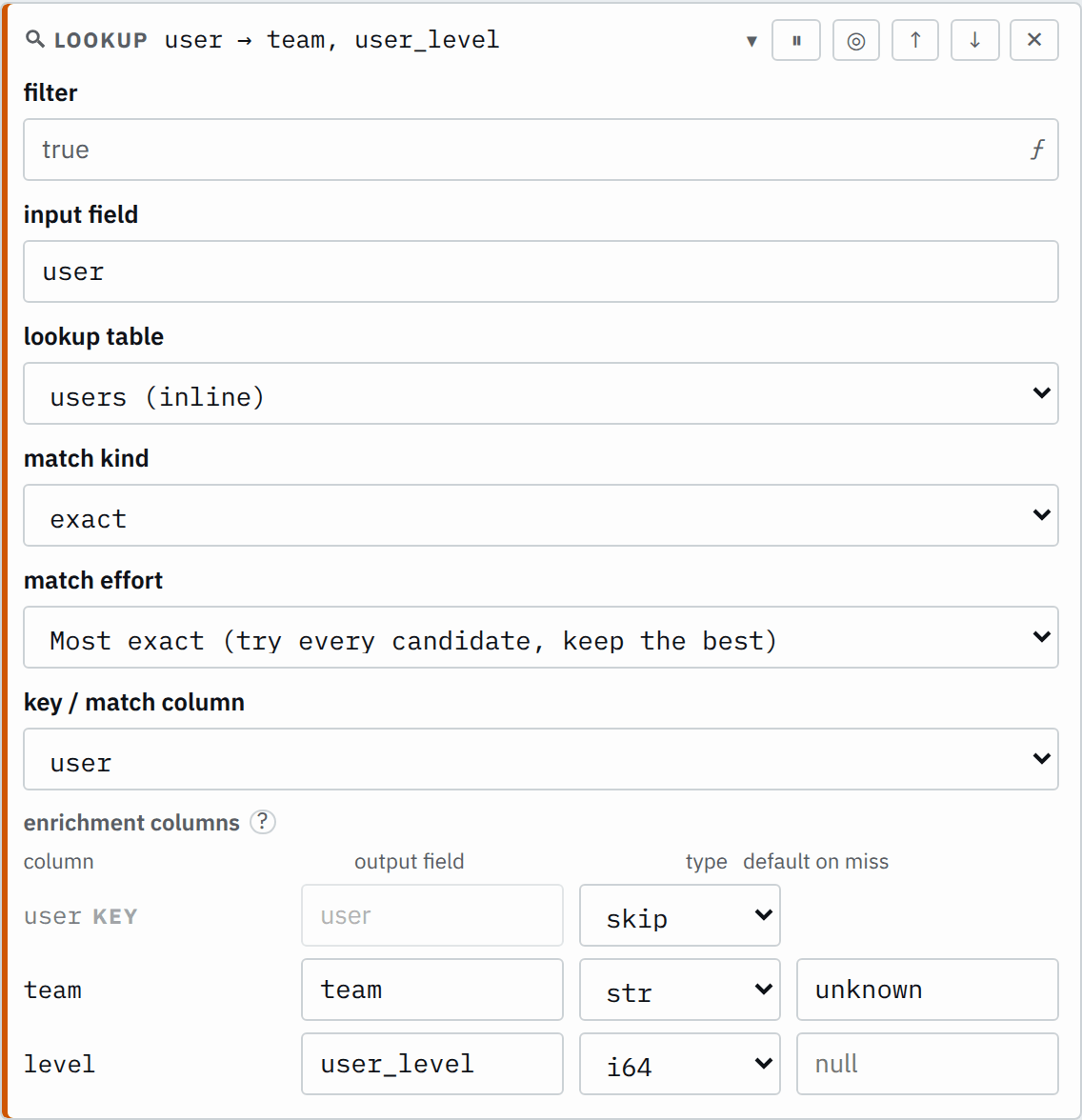

Saved JSON
{
  "id": "lookup",
  "type": "lookup",
  "input": "user",
  "table": "users",
  "matchKind": "exact",
  "multiplicity": "best",
  "keyColumn": "user",
  "outputs": [
    {
      "source": "team",
      "field": "team",
      "default": "unknown"
    },
    {
      "source": "level",
      "field": "user_level",
      "default": "",
      "type": "i64"
    }
  ]
}
Input
{
  "user": "alice"
}
{
"user": "carol"
}Output
{
  "user": "alice",
  "team": "payments",
  "user_level": 3
}
{
"user": "carol",
"team": "unknown"
}The step looks up each user in the inline table users and adds the
user's team and user_level.
Settings
It also takes the settings every step takes.
input field required
The record's value to look up. Dots name a nested field.
usersource.ipmatchKind string required
How the table is compared with the input. An MMDB table takes cidr.
exact- Finds the rows whose
keyColumnequals the input. cidr- Finds the rows whose
keyColumnholds a network that contains the input address. regex- Finds the rows whose
keyColumnis a regular expression that matches somewhere in the input.
multiplicity string default best
Which matching rows it writes the outputs from. The editor names them Most exact, First match and All matches.
best- Writes from the most exact matching row: the longest prefix for
cidr, the longest pattern forregex, and the first matching row forexact. first- Writes from the first matching row in table order.
all- Writes from every matching row, in table order, so each output is an array. An MMDB table refuses it.
keyColumn string default none
The table column compared with the input. An MMDB table has none.
useroutputs list of outputs required
Each output writes the table's source column, or an MMDB record's dotted path, to the record's field, with an optional type (str unless given) and default on a miss (null unless given).
[{"source": "team","field": "user_team","default": "unknown"}][{"source": "risk_score","field": "user_risk","type": "i64","default": "0"}]An output's type is str, i64, f64, bool or datetime. A datetime reads an epoch number or a
common date text by itself. Choose auto in the editor to give a parseTime format instead. A blank default means null.
In the editor, multiplicity is match effort and keyColumn is key / match column. For a CSV or inline table, outputs shows as enrichment columns: one row per table column,
with the output field it writes, its type, and its default on miss. The step leaves out a column
typed skip, and every column starts as skip until you choose otherwise. The keyColumn comes first, marked key, and takes no default on miss. When the editor does not know
the table's columns, an outputs list stands in for the enrichment columns: each row
maps a column name to an output field, with a type and a default on miss.
How it works
Lookup tables
A lookup table is shared by id: any Lookup step in any pipeline can name it. Manage tables under Build, Resources, Lookup tables. A group also
sees the tables of shared/. A table is one of three types:
| Type | Holds |
|---|---|
| CSV file | A CSV file whose first row names the columns, with its own delimiter. |
| Built by hand | An inline table: columns and rows you type into the page. |
| MaxMind DB (MMDB) file | A MaxMind database of IP networks, such as a GeoIP file. |
An upload, of up to 2 GiB, goes to the leader's lookup store, and the commit holds a pointer to it. Each worker fetches the files its deployment names and checks them against the pointer. A worker maps a file rather than copying it, and builds a CSV table's index once. Every table loads once, when the pipeline is compiled.
CSV and inline tables
The step matches a CSV or inline table on its keyColumn. The step reads the input field, compares it with that column in every row, and writes each output's source column of the matching rows to its field. The record's other
fields remain.
Match a value exactly
An exact match finds the rows whose keyColumn equals the input. In the example, the JSON parser before the lookup declares user as
a str. carol is not in the table, so team takes its default
on miss, unknown. user_level has a blank default, so it is null and
absent from JSON output. user_level is typed i64, so 3 is a
number.
Match an IP address to a network
A cidr match finds the rows whose keyColumn holds a network that contains
the input address. IPv4 and IPv6 both work. An input that is not an IP address is a miss.
| network | zone |
|---|---|
10.0.0.0/8 | internal |
10.1.0.0/16 | office |
Step
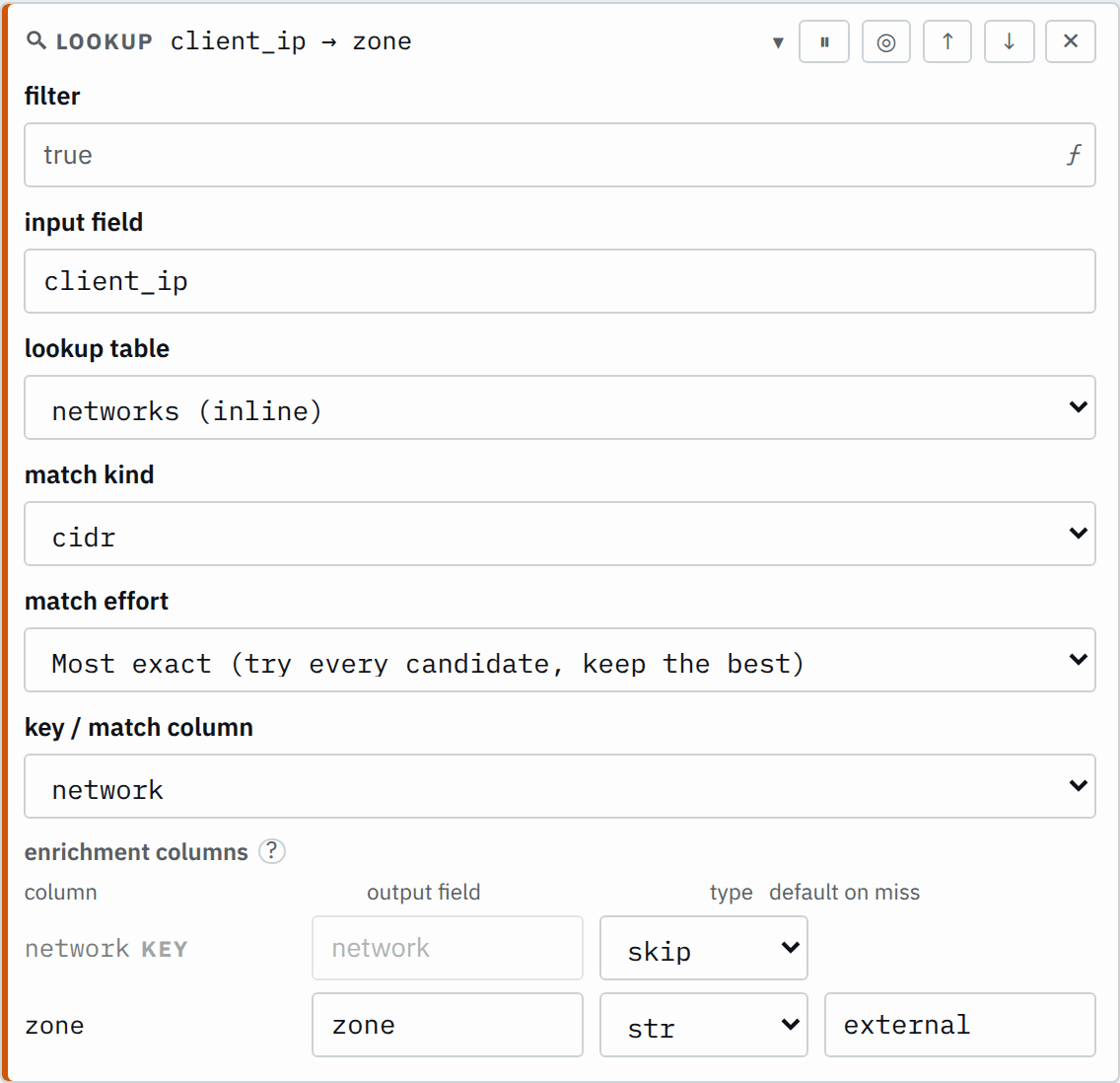

Saved JSON
{
  "id": "lookup",
  "type": "lookup",
  "input": "client_ip",
  "table": "networks",
  "matchKind": "cidr",
  "multiplicity": "best",
  "keyColumn": "network",
  "outputs": [
    {
      "source": "zone",
      "field": "zone",
      "default": "external"
    }
  ]
}
Input
{
  "client_ip": "10.1.2.3"
}
{
"client_ip": "10.9.0.1"
}{
"client_ip": "8.8.8.8"
}Output
{
  "client_ip": "10.1.2.3",
  "zone": "office"
}
{
"client_ip": "10.9.0.1",
"zone": "internal"
}{
"client_ip": "8.8.8.8",
"zone": "external"
}10.1.2.3 is in both networks. best keeps the longest prefix, 10.1.0.0/16.
Match a pattern
A regex match finds the rows whose keyColumn is a regular expression
that matches somewhere in the input. Anchor it with ^ and $ to match the
whole value.
| pattern | role |
|---|---|
^web- | web |
^db- | database |
^db-.*-replica$ | replica |
Step
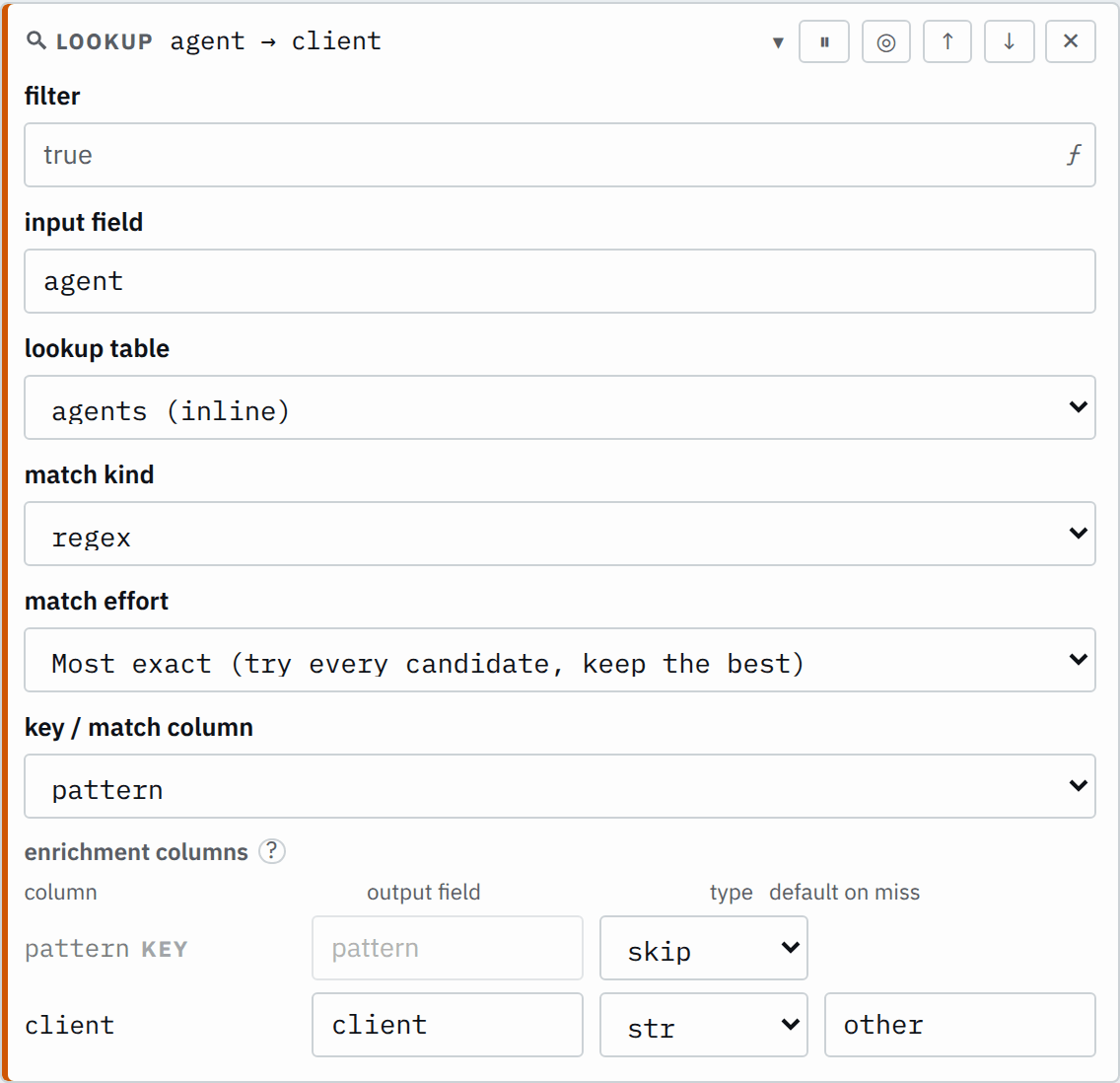

Saved JSON
{
  "id": "lookup",
  "type": "lookup",
  "input": "host",
  "table": "roles",
  "matchKind": "regex",
  "multiplicity": "best",
  "keyColumn": "pattern",
  "outputs": [
    {
      "source": "role",
      "field": "role",
      "default": "other"
    }
  ]
}
Input
{
  "host": "db-03-replica"
}
{
"host": "db-01"
}{
"host": "web-02"
}{
"host": "cache-01"
}Output
{
  "host": "db-03-replica",
  "role": "replica"
}
{
"host": "db-01",
"role": "database"
}{
"host": "web-02",
"role": "web"
}{
"host": "cache-01",
"role": "other"
}db-03-replica matches both ^db- and ^db-.*-replica$. best keeps the pattern with the longest text.
Several matching rows
multiplicity chooses which of the matching rows the step writes the outputs from, when
more than one row matches.
multiplicity | Uses | Output |
|---|---|---|
best | cidr: the longest prefix. regex: the longest pattern text. exact: the first matching row. A tie keeps table order. | one value |
first | The first matching row in table order. | one value |
all | Every matching row, in table order. | an array |
With all, each output field is an array of its type. A miss gives an empty array.
With a default on miss, it gives an array holding that one default.
| network | zone |
|---|---|
10.0.0.0/8 | internal |
10.1.0.0/16 | office |
Step
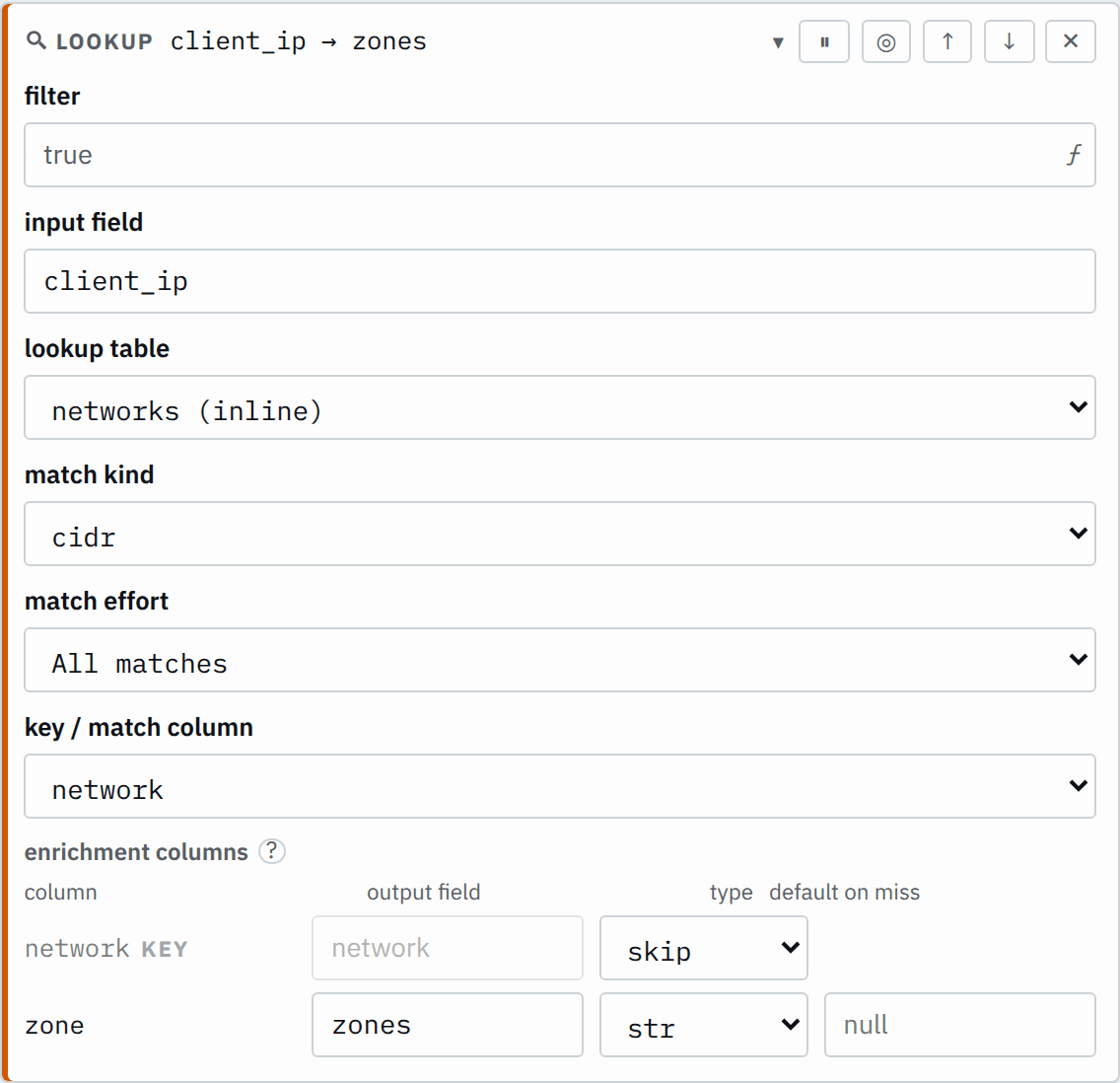

Saved JSON
{
  "id": "lookup",
  "type": "lookup",
  "input": "client_ip",
  "table": "networks",
  "matchKind": "cidr",
  "multiplicity": "all",
  "keyColumn": "network",
  "outputs": [{ "source": "zone", "field": "zones", "default": "" }]
}
Input
{
  "client_ip": "10.1.2.3"
}
{
"client_ip": "8.8.8.8"
}Output
{
  "client_ip": "10.1.2.3",
  "zones": ["internal", "office"]
}
{
"client_ip": "8.8.8.8",
"zones": []
}MMDB tables
An MMDB table is a MaxMind database: a file of IP networks, each carrying a record of values,
such as a GeoIP file. The step matches the input address against the networks in the file and
reads its outputs from the record of the most specific network that contains it. Its matchKind is always cidr, and it finds at most one record, so it has
no keyColumn and no multiplicity. An input that is not an IP address is a
miss.
Each output's source is a dotted record path, such as country.iso_code. A value that does not read as its output's type is null on its
record, with a warning; Smeltr still delivers the record.
Process selected records
When the filter is false or null, the record continues with its existing values, and the output fields keep what they held.
Misses and types
- A miss adds no errors or warnings: each output takes its default on miss, or null when the default is blank.
- The step compares an input of type
str,i64,f64orboolas its text, andbytesas its base64, so a status code404matches the key404. A null or missing input is a miss.
Troubleshooting
- Saving fails because the input field has no type
- The
inputfield needs a type. A field a JSON or Key/value parser did not declare has none; declare it in the parser, or convert it in an earlier step. - The pipeline fails to compile before any worker runs
- Check the table: a missing file, a malformed CIDR block or regex in the
keyColumn, or a row with the wrong number of cells. Check that each cell of a CSV or inline table, and each default on miss, reads as its output's type. Check that thekeyColumnand every output'ssourceare columns of the table.