Amazon S3
Lists a prefix of one bucket every poll interval, reads each object it finds new or changed, and splits it into records.
It reads a bucket that cannot announce its objects. When the bucket can send event notifications, use Amazon S3 via SQS instead: it reads an object as soon as the bucket announces it, lists nothing, and every worker of the group reads from the queue. Only one worker of each group reads this source at a time.
Example
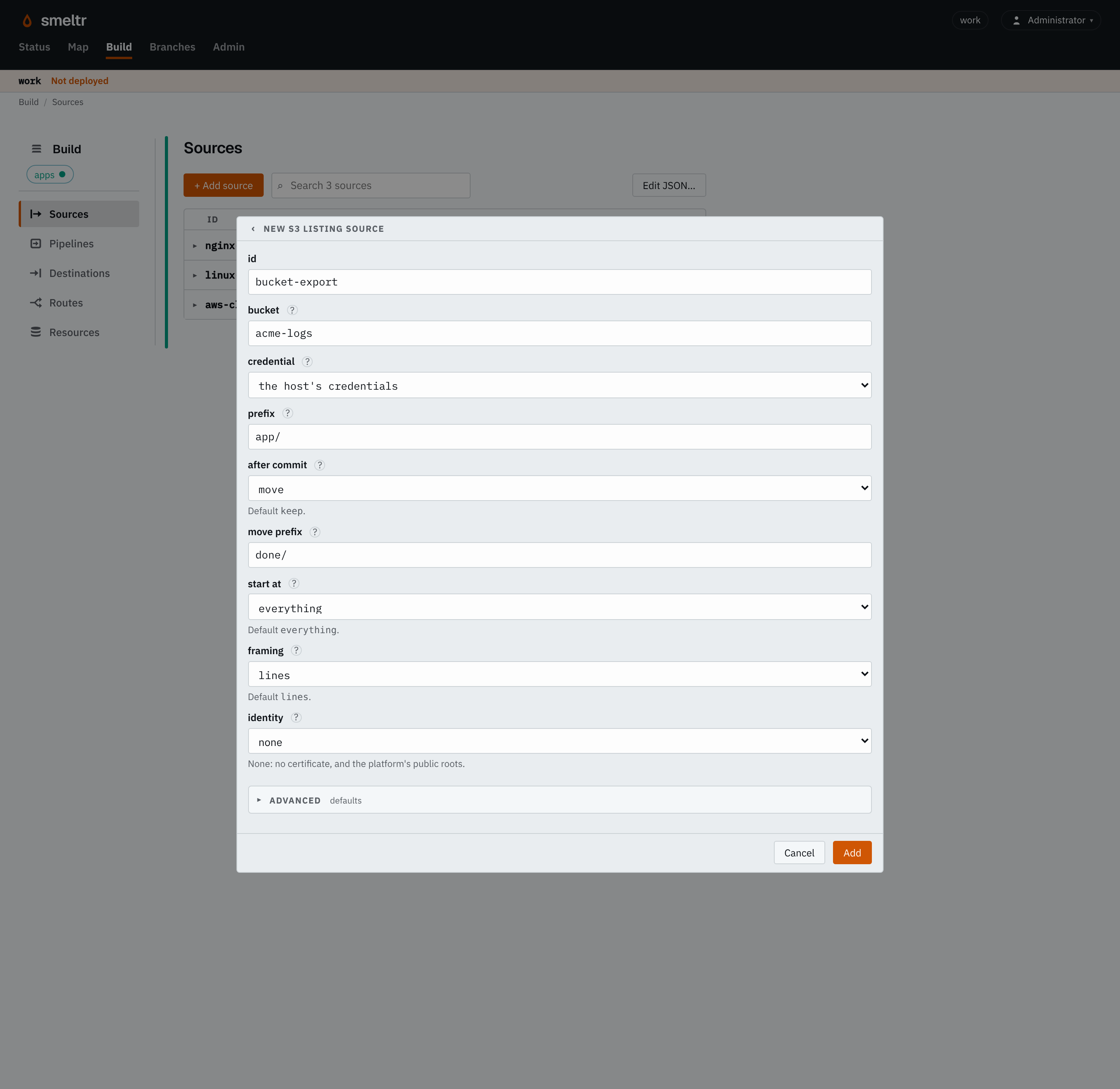
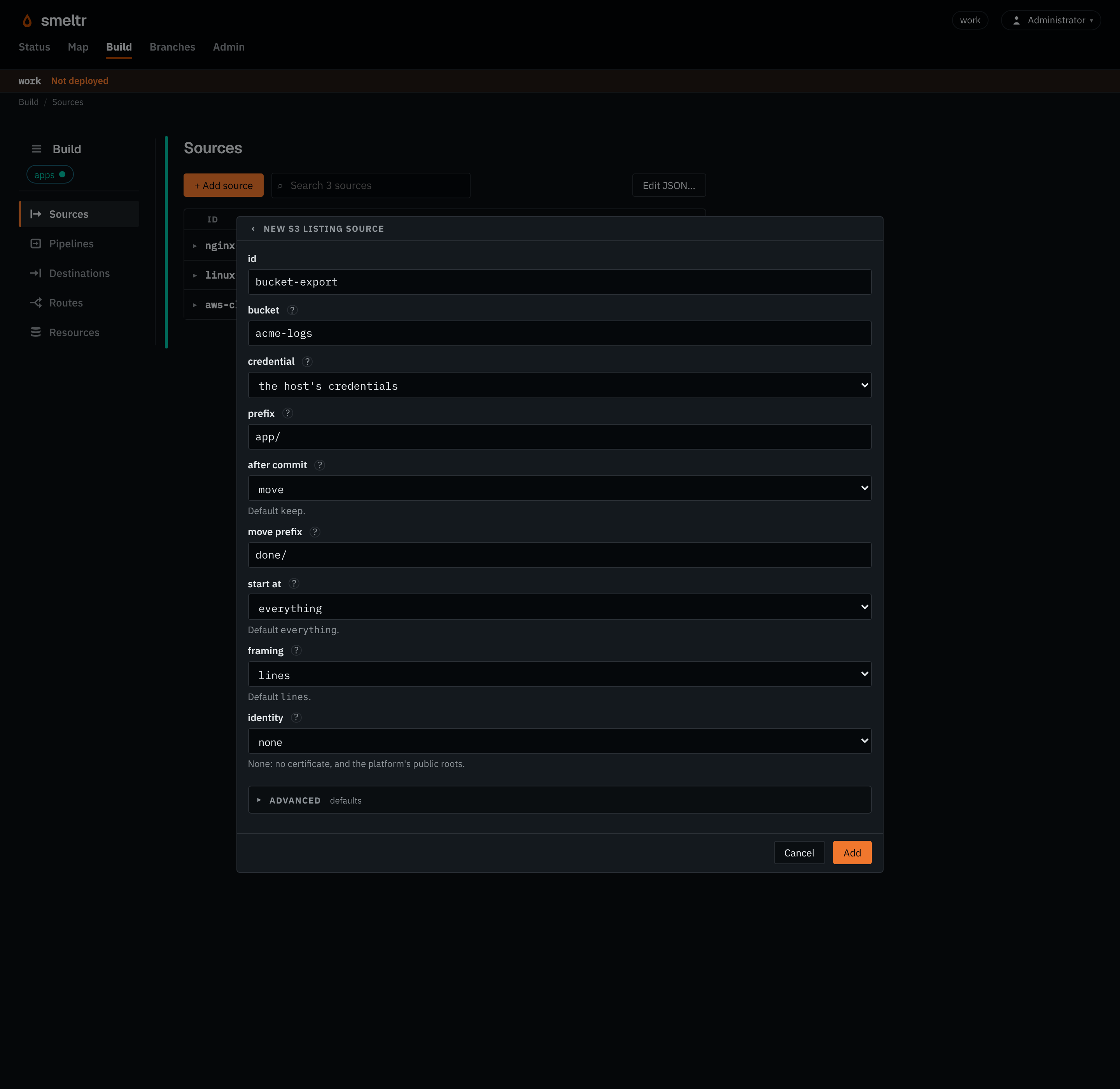
Reads each object under app/ one line per record, with the worker host's AWS
credentials, and moves each object under done/ once Smeltr delivers it.
{
  "id": "bucket-export",
  "type": "s3List",
  "bucket": "acme-logs",
  "prefix": "app/",
  "region": "us-east-2",
  "framing": "lines",
  "afterCommit": "move",
  "movePrefix": "done/"
}
Before you start
- Choose what happens to an object once Smeltr delivers it: kept, deleted, or moved under
another prefix (
afterCommit). Deleting or moving keeps each listing short. - Allow the credentials Smeltr uses
s3:ListBucketon the bucket ands3:GetObjecton the objects under the prefix. To delete, also allows3:DeleteObjectunder the prefix. To move, which copies each object and then deletes it, also allows3:DeleteObjectunder the prefix ands3:PutObjectundermovePrefix.
Settings
It also takes the settings every source takes.
bucket string required
The bucket's name, alone.
acme-logsacme-cloudtrail-111122223333logs.acme.exampleprefix string default
Only objects whose key starts with it. It does not start with /. Empty is the whole bucket.
app/AWSLogs/111122223333/CloudTrail/logs/2026/accessKeyId credential default the host's credentials
The credential holding the access key's id. Set both accessKeyId and secretAccessKey, or neither.
AWS_ACCESS_KEY_ID{"secret": "aws-access-key-id","version": 1}secretAccessKey credential default the host's credentials
The credential holding the access key's secret.
AWS_SECRET_ACCESS_KEY{"secret": "aws-secret-access-key","version": 1}format string default each payload is text, in _raw
How each payload becomes the record.
avro- Reads Avro files. Fields you don't declare are kept.
fields list of fields default none
The Avro fields to read, each with a name and a type such as i64 or str. Name a nested field with dots, such as user.id. Top-level fields you don't list are kept. Only with format avro.
[{"name": "user_id","type": "i64"},{"name": "user.name","type": "str"}]framing string default lines
How an object becomes records.
lines- Gives one record per line, or per piece
lineBreakercuts. object- Gives the whole object as one record, for a JSON document such as CloudTrail's that a pipeline unrolls.
escapedLines- Gives one record per line, unescaped as a
bytesobject destination wrote it.
lineBreaker string default a record per line
With lines framing, and only then: where a record ends. Its first capture group is the break and is dropped: the bytes before it end a record, line ends and all, and the bytes after it start the next. What follows the group is kept, so the pattern can say how a record starts: ([\r\n]+)\d{4}- keeps a stack trace with the line that logged it, and </event>(\s*) cuts XML events with no line ends between them. It needs a capture group and must not match the empty string.
([\r\n]+)\d{4}-</event>(\s*)identity identity default none
The connection identity it connects under, for a private CA or a client certificate.
aws-proxycorp-proxyafterCommit string default keep
What it does with an object once every record is delivered.
keep- Leaves it and records it as read. Needs only read access, and costs a full listing per poll.
delete- Deletes it.
move- Copies it under
movePrefixin place ofprefix, then deletes it.
movePrefix string default none
Where move puts an object, in place of prefix. Only with move, and outside prefix. It does not start with /, and ends in / when prefix does or is empty, and only then.
done/archive/2026/processed/app/Advanced
start string default everything
What it reads first.
everything- Reads everything its first listing finds.
new- Reads only what arrives after its first listing. Needs
afterCommitkeep.
pollIntervalSecs integer default 60
Seconds from the start of one listing to the start of the next. At least 1.
300303600region string default the host's
The bucket's region.
us-east-2eu-west-1endpoint string default the host's, else AWS
An S3-compatible service's address. Without an access key, the worker host's AWS settings, such as AWS_ENDPOINT_URL, come first.
https://minio.example.com:9000http://localhost:9000https://objects.example.comroleArn string default none
A role to assume, for a bucket in another account.
arn:aws:iam::111122223333:role/smeltr-readerarn:aws-us-gov:iam::444455556666:role/log-archive-readerexternalId string default none
The external id the role requires. Only with roleArn.
smeltr7f3c1a9e-2b4d-4e8f-9a61-0c5d3e2b1f47authEndpoint string default the region's own
Where the role in roleArn is assumed. Only with roleArn.
https://sts.us-east-2.amazonaws.comhttps://sts.us-gov-west-1.amazonaws.comhttps://sts.amazonaws.comencoding string default auto
How a record's bytes become _raw's text: auto, none, or a WHATWG encoding label other than the replacement ones, such as utf-8, utf-16le or shift_jis.
auto- Detects each record's encoding.
utf-8- Decodes every record as UTF-8, as any other label decodes as its own encoding. Bytes that do not decode become U+FFFD.
none- Decodes nothing: the record has no
_raw, and its payload is__source.bytesalone. A pipeline reads it as text withdecode(__source.bytes, encoding).
Fields it gives
| Field | Type | Holds |
|---|---|---|
__source.name | str | The name of the source that read the record. |
__source.type | str | The kind of source that read it, its type, such as kafka, s3List, httpApi or hecReceiver. |
__source.bucket | str | The bucket, or Azure container, the record's object is in. |
__source.key | str | The key, or Azure blob name, of the object the record was read from. |
__source.offset | i64 | The record's offset in its Kafka or Event Hubs partition, or its record number in its object, from 0. |
__source.bytes | bytes | The record's payload as the source read it, before any decoding. The source decodes _raw from it. A bytes destination writes it unless the destination names another field. Text functions refuse it; decode(__source.bytes, encoding) reads it as text. |
How it works
Every poll interval the source lists every key that starts with prefix, and reads
each object it has not read before or that has changed since it last read it. It reads an object
whole, so it reads a changed object again from its start. The source decompresses a gzip, zstd,
framed snappy or framed lz4 object first and reads any other as it is. An empty object holds no
record, and the source does not read it.
One worker of the group reads the source at a time: the leader holds it for that worker, and the others run it and read nothing. The leader gives the hold to another worker after three heartbeat intervals without hearing from the holder, the holder's interval or the leader's, whichever is longer, and that worker resumes from the last progress the leader kept. That worker delivers again what the previous holder delivered after that progress. A holder cut off from the leader keeps reading, so until that heals two workers can read the same objects: that costs duplicates, never lost records.
afterCommit says what the source does with an object once Smeltr delivers every record
of it:
keepleaves it in the bucket and records its key and version in a ledger. The holder reports the ledger to the leader, and the next holder reads only what it does not hold. A key gone from the bucket leaves the ledger. Every listing lists everything under the prefix, and the ledger holds one entry per object there.deletedeletes it, andmovecopies it undermovePrefixin place ofprefixand then deletes it. The bucket then holds only what is left to read, and the source keeps no ledger. An object replaced since the source read it stays in place, and the source reads it again. It deletes or moves an empty object unread.
start says what the source reads first. everything reads every object
its first listing finds. new records what its first listing finds in the ledger as
read, and reads only objects that arrive or change after it; it needs afterCommit keep, the only setting that keeps a ledger.
The source's progress belongs to its name and to its bucket and prefix. Renamed, or pointed at another bucket or prefix, it starts afresh.
Once you remove the source and deploy, the leader forgets its progress, so a rollback that brings the source back starts it afresh.
An object handed out five times and never delivered counts as unreadable, and the worker logs a
warning naming it. With keep it is recorded as read; with delete or move it is left in the bucket. It is read again only once it changes. With delete or move only the holder remembers it, so a restart or a new holder hands it out again.
Verify
Upload an object with a line you can recognize under the prefix, then find that line at the
destination within a poll interval. With delete the object is then gone from the
bucket; with move it is under movePrefix.
On the Sources page, the worker column names the worker holding the source, and
with keep how many objects its ledger holds.
Troubleshooting
- Nothing arrives
- Check that the object's key starts with
prefix, which does not start with/. Check the worker log for a listing that fails, and that the credentials allows3:ListBucket. Withstartnew, the source does not read an object already there at the first listing until it changes. - The worker column is empty
- No worker of the group holds the source: check that a worker of the group is running and reaches the leader.
- Objects stay in the bucket with delete or move
- Check
s3:DeleteObjectunder the prefix, and formoves3:PutObjectundermovePrefix, then the worker log for the reason. An object the source could not read stays too, until it changes.